
Findmykids: Parental Control
LETEM LTDParenting
4.613.04K Reviews
- Version
- 2.13.10-google
- Installs
- 50.00M
- Age Rating
- Everyone
Screenshots
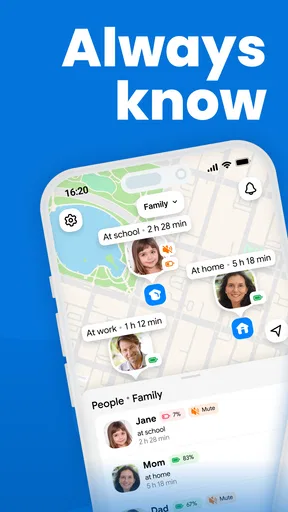
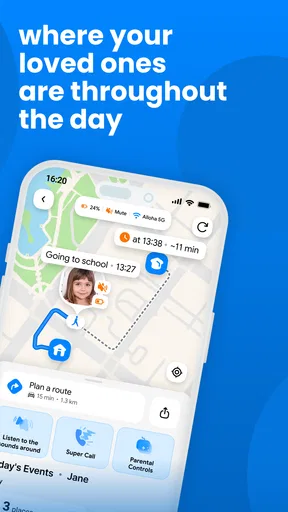
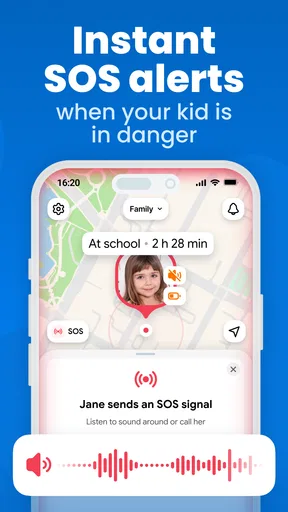
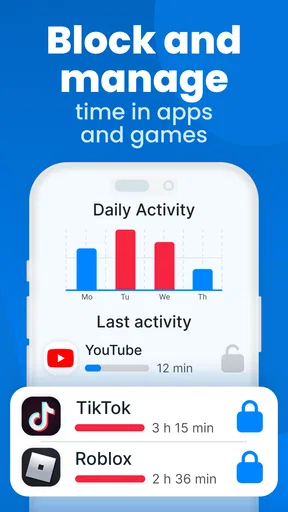
Our Review of Findmykids: Parental Control
 Analysis by Appyee
When a child’s trip home runs late, the hard part is often not knowing whether to wait, call, or change plans. I see the appeal of Findmykids: Kids GPS Tracker in those ordinary moments: it gives a family a way to check a child’s location and coordinate a response without making every afternoon a string of calls. It is a parenting app from LETEM LTD, and its focus is practical reassurance rather than replacing a conversation.
One family, more than one phone
A shared household can make any location app feel useful and complicated at the same time. One parent may be doing pickup while another is at work, and both may need the same basic answer: has the child arrived, or should we adjust the plan? A tracker can reduce the need to relay every update by text, but it works best when the adults agree on who checks it and what they will do with what they see.
I would treat the app as a coordination aid, not a substitute for a family’s usual communication. If one adult is responsible for collecting a child, a quick location check may help them decide whether to wait or call. If another adult is also following along, a short conversation about who is taking action can prevent two people from making conflicting assumptions. The app can provide context; the household still has to make the decision.
Decide who uses which device
Before setting anything up, I would make a simple plan for the devices involved. A parent’s phone and a child’s phone have different purposes, and a shared family device can blur that line. Be clear about which device belongs to whom, who is expected to carry it, and which adult will be responsible for checking in. That small bit of household housekeeping matters more than adding another setting if the phone is often left on a kitchen counter.
Families who share a phone should be especially deliberate. If the device is sometimes used by a sibling or another adult, the location shown may not tell you which person is carrying it. In that situation, a direct call or message is a better way to confirm who has the phone. I would not use a device’s location as proof of a child’s whereabouts when the device itself changes hands.
It is also worth agreeing on a backup routine. A child can forget a phone, run out of battery, or be unable to answer at a busy moment. Decide in advance what the child should do if plans change and what the adult should do if the app is not giving a useful answer. A familiar meeting point or a simple call plan can be more dependable than expecting one app to resolve every uncertainty.
Location checks should support coordination
For a realistic weekday example, imagine a child walking from school to an after-school activity while a parent is held up at work. A location check can help the parent see whether it is time to leave, while a message can confirm whether the child is following the usual plan. If the child is delayed, the app may help the adults respond sooner, but it cannot explain why the delay happened. A calm check-in still matters.
This is where location tracking differs from the usual alternatives. A family group chat is good for sharing plans and asking questions, but it relies on someone noticing and replying. A map-sharing tool can show where a phone is, yet it may not be designed around parent-child check-ins. Findmykids combines location-focused use with chat and an SOS option, so it is aimed at families who want those tasks together. If all you need is occasional coordination, a phone call or shared calendar may be simpler and less intrusive.
One useful habit is to decide what counts as a reason to act before a notification appears. A child being a few minutes later than expected may simply mean a crowded exit or a slow walk; it does not automatically mean something is wrong. Agreeing on a reasonable check-in threshold helps location alerts stay useful rather than turning every small change into a source of stress.
Trust changes with age
For younger children, an adult-managed location tool may feel like an ordinary part of getting to school or activities. As children get older, the same tracking can feel more personal. I would explain what the family uses it for, when an adult might check, and what the child should do if they need help. Being open about the purpose is more respectful than letting a child discover the tracking only after a disagreement.
The app is rated for Everyone, but that rating is not a recommendation to use every feature in the same way for every age. A young child and a teenager have different needs for privacy and independence. For an older child who can reliably communicate and travel familiar routes, a check-in agreement may be a better fit than frequent location checking. The right balance depends on the child, the route, and the family’s trust—not simply on whether the app can display a location.
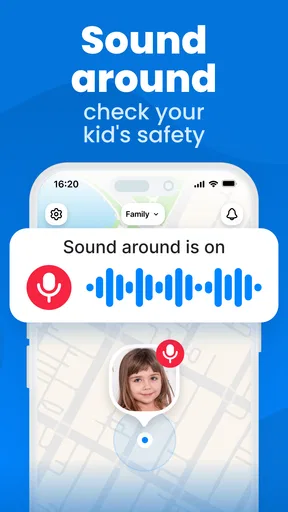
I would also keep sensitive features within clear boundaries. The Sound Around option is described in the app as a way to listen to the child’s surroundings, which is a more intrusive step than checking a map or sending a message. I would reserve it for a genuine safety concern, explain its purpose to the child in age-appropriate terms, and avoid treating it as a routine way to monitor ordinary activity. If a family is uncomfortable with that level of access, it can choose not to rely on that feature.
Where the app fits—and where it does not
This is most useful for households with children who travel between regular places and adults who need to coordinate around pickups, school, or activities. It may also suit a family that wants location checking and direct check-ins in one parenting-focused app rather than piecing together separate tools. The app is free to download, though it offers in-app purchases ranging from $0.39 to $349.99 per item, so I would check the purchase details before committing to anything beyond basic use.
It is less compelling if everyone in the family already communicates reliably and location sharing is rarely needed. It may also be the wrong choice for a household that wants a tracker to operate without discussion, or for a child who does not have a consistently carried phone. Location information is only useful when the device is with the person, working, and being used as expected. No tracker can remove the need for a backup plan or guarantee that an adult will interpret a situation correctly.
As a parenting app, it sits between basic phone-based location sharing and a manual check-in routine. Its 4.6 average rating from around 1.9 million ratings and more than 50 million installs show that many people have tried it, but popularity does not tell me whether it suits a particular family. I would judge it by whether its location and communication tools fit the family’s routine without creating more checking than the situation calls for.
The app has been available since June 17, 2015, and its current version is 2.10.40-google, with Android 8.0 as the minimum operating system. It is free, rated for Everyone, and has around 12,000 written reviews. Those details make it easy to understand the broad audience it serves, but the practical decision is simpler: does your household need a dedicated way to coordinate a child’s movements, and can everyone agree on sensible boundaries?
My advice is to start with one ordinary use case, such as confirming arrival at school or coordinating an activity pickup, rather than trying to make the app responsible for every part of family safety. Talk through what the child should do if a plan changes, and decide which adult responds to a message or alert. That keeps the technology in its proper role: helpful information for people who still need to communicate.
Keeping Tabs with Ease
First off, the app is super user-friendly. From the moment you download it, the setup process is a breeze. I mean, who really has the time to fiddle around with complicated settings, right? Once you’ve got it up and running, you can track your kid’s location in real-time. It's like magic! Imagine being able to see if they’re at school, or if they’ve wandered off to a friend’s house.
Geofencing: Your New Best Friend
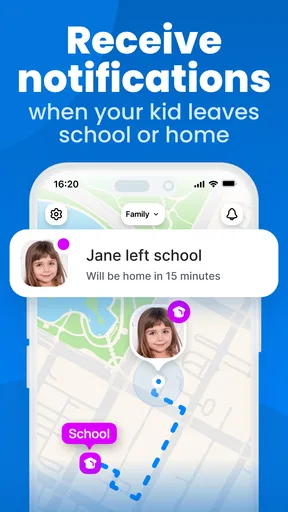
One feature that really stood out to me is the geofencing option. You set up safe zones, like your home or school, and get notified when your child enters or leaves these areas. It’s like having a security perimeter that alerts you without being too overbearing. I found it handy, especially during those hectic days when you’re juggling a million things.
Communication Made Simple
Another cool aspect is the built-in chat feature. It doesn’t just track locations; it lets you send quick messages to check in. Plus, there’s a neat SOS button that your kid can press if they ever feel unsafe. It’s like having a direct line to your kiddo at all times without hovering over them.
Sound Around: A Sneak Peek
Okay, this part is a bit James Bond-ish. The app has this Sound Around feature where you can listen to the environment around your child. It’s discreet and only to be used in emergencies. While I didn’t have any dire situations to test this out, it’s comforting to know it’s there if needed.
Battery-Friendly Tracking
I was pleasantly surprised by how Findmykids: Kids GPS Tracker doesn’t drain your phone’s battery. It uses a smart tracking system that conserves energy, which means you don’t have to worry about your phone dying in the middle of a busy day.
Overall, this app offers a solid mix of features that are practical for everyday life. Whether you’re a parent who wants that extra layer of security or just someone who likes to keep tabs on their family’s whereabouts, this app is worth a shot. It’s like having a safety net that’s always there, ready to catch you or your little ones when you need it most.
Privacy and Permissions
See what permissions an app requests and how it handles your data.
- Contacts
- read your contacts
- Location
- approximate location (network-based), precise location (GPS and network-based)
- Phone
- read phone status and identity
- Photos/Media/Files
- read the contents of your USB storage, modify or delete the contents of your USB storage
- Storage
- read the contents of your USB storage, modify or delete the contents of your USB storage
- Camera
- take pictures and videos
- Microphone
- record audio
- Wi-Fi connection information
- view Wi-Fi connections
- Device ID & call information
- read phone status and identity
- Other
- view network connections, pair with Bluetooth devices, access Bluetooth settings, connect and disconnect from Wi-Fi, full network access, change your audio settings, run at startup, draw over other apps, control vibration, prevent device from sleeping
Verdict
Strengths of Findmykids: Parental Control
- User-friendly interface for easy navigation.
- Real-time location tracking for peace of mind.
- SOS feature for emergency alerts.
- Customizable geofencing alerts.
- Battery level monitoring on child's device.
Limitations of Findmykids: Parental Control
- Requires constant internet connection.
- Can drain the child's device battery quickly.
- Subscription needed for advanced features.
- Privacy concerns with location data.
- Limited features in the free version.
Similar Picks in This Category
View All
Family Space
Motorola Mobility LLC.3.9

شرطة الأطفال - مكالمة وهمية
Oub Apps4.1

Pregnancy + | Tracker App
Philips Electronics UK Limited4.8

Policía de niños - para padres
Kids police4.7

Pregnancy App
Amila4.9

Pregnancy and Due Date Tracker
Wachanga4.5
You May Also Like
View All


Frequently Asked Questions
How accurate is the location tracking feature in Findmykids?
Findmykids utilizes GPS technology to provide real-time location tracking with a high degree of accuracy. The app is designed to offer precise location data, but accuracy can depend on factors like GPS signal strength and network availability. Users generally find the tracking reliable for keeping tabs on their children's whereabouts.
Does Findmykids work without an internet connection?
Findmykids requires an internet connection to transmit location data and updates. While GPS can function without internet, the app needs a connection to send and receive information. Users should ensure that the child’s device has mobile data or Wi-Fi access for optimal performance.
What are the privacy features of Findmykids?
Findmykids prioritizes user privacy with secure data encryption and strict access controls. Only authorized users can view the location data. The app also complies with international privacy standards, ensuring that personal information is kept safe from unauthorized access and misuse.
Is there a subscription fee for using Findmykids?
Findmykids offers both free and premium subscription options. The free version provides basic tracking features, while the premium version includes advanced features such as location history, geofencing, and more. Users can choose a plan that best suits their needs and budget.
Can Findmykids be used to track multiple children simultaneously?
Yes, Findmykids supports tracking multiple children at the same time. Parents can add multiple devices to their account, allowing them to monitor each child individually. This feature is particularly useful for families with several children, providing peace of mind to parents.
